
When selecting a coax-to-waveguide adapter, prioritize frequency range (e.g., 18-26.5 GHz for K-band), VSWR (<1.25:1), insertion loss (<0.3 dB), connector type (SMA/N), and proper flange alignment (UG-387/U for WR-42) to ensure optimal signal integrity.
Table of Contents
Frequency Range Check
When picking a coax-to-waveguide adapter, the frequency range is the most critical factor—get it wrong, and your system won’t work. Waveguides operate within strict frequency limits, and mismatched adapters cause signal loss (3 dB or more), reflections (VSWR >1.5), or even complete failure in high-power applications. For example, a standard WR-90 waveguide works between 8.2 GHz and 12.4 GHz, but if you try to push a 6 GHz signal through it, 80% of the power could be lost due to cutoff frequency effects.
”A 10% mismatch in frequency range can lead to a 15-20% drop in efficiency—costing you time and money in retesting or replacements.”
Most adapters list their operational bandwidth, but real-world performance depends on insertion loss (typically 0.1-0.5 dB) and return loss (better than -20 dB for good designs). If your application runs at 24 GHz, don’t buy an adapter rated for 18-26 GHz and assume it’ll work perfectly—check the actual tested specs, not just the marketing range. Some cheaper models degrade rapidly near the edges of their claimed range, with VSWR jumping from 1.2 to 2.0 at the upper limit.
Material quality also impacts frequency stability. Aluminum adapters handle up to 50 GHz well, but for mmWave (60+ GHz), brass or copper-plated versions reduce skin effect losses (up to 30% better conductivity). If your system runs pulsed signals (1-10 µs pulses at 1 kHz PRF), verify the adapter’s peak power rating (often 2-3x lower than CW ratings)—otherwise, arcing or heating can occur.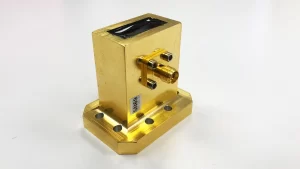
Connector Type Match
Picking the wrong coax connector for your waveguide adapter is like forcing a square peg into a round hole—it might seem to work at first, but performance tanks fast. A 3.5mm connector mistakenly used with an N-type port can cause up to 40% signal loss at 18 GHz, and mechanical stress from mismatched threads can shorten the adapter’s lifespan by 50% or more. The most common mistake? Assuming all SMA connectors are the same—when in reality, precision SMA (3.5mm) handles up to 26.5 GHz, while standard SMA fails beyond 18 GHz.
Here’s a quick breakdown of popular coax connectors and their waveguide compatibility:
| Connector Type | Max Frequency | Typical Waveguide Pairing | Power Handling (avg. CW) | Mismatch Loss Risk |
|---|---|---|---|---|
| N-Type | 11 GHz | WR-90 (X-band) | 300W | High (>30%) above 8 GHz |
| SMA | 18 GHz | WR-62 (Ku-band) | 100W | Moderate (15-20%) near max freq |
| 3.5mm | 26.5 GHz | WR-42 (K-band) | 50W | Low (<10%) if properly torqued |
| 2.92mm | 40 GHz | WR-28 (Ka-band) | 20W | Critical: 1 dB loss per misalignment |
| 1.85mm | 65 GHz | WR-15 (V-band) | 10W | Catastrophic if threads cross-threaded |
Gender and polarity matter just as much as type. A male SMA on a female waveguide flange won’t physically connect, and reverse-polarity setups (like RP-SMA) can reflect 25% of the signal even if they mechanically fit. For high-power radar (1-5 kW pulses), N-type is the go-to for durability, but its large size (16mm hex) can cause space issues in dense arrays.
Thread tolerance is another silent killer. Cheap SMA adapters with ±0.1mm thread errors can increase VSWR from 1.2 to 1.8 at 24 GHz, turning a $200 amplifier into a glorified heater. Always check military specs (MIL-STD-348) for critical apps—commercial-grade connectors often wear out after 500 cycles, while mil-spec versions last 5,000+ matings.
Power Handling Limits
Pushing too much power through a coax-to-waveguide adapter doesn’t just degrade performance—it literally burns money. A $50 adapter rated for 50W CW will fail catastrophically if subjected to 200W pulsed radar signals (1µs pulses at 1kHz PRF), even if the average power seems “safe.” The most common failure mode? Dielectric breakdown in the adapter’s insulator, which can happen in under 10 seconds at just 20% over the rated limit. For example, a typical WR-75 waveguide adapter might handle 100W continuous wave (CW) at 10 GHz, but that drops to 30W at 18 GHz due to increased skin effect losses (up to 40% higher at higher frequencies).
Thermal runaway is another silent killer. Aluminum adapters dissipate heat 60% faster than brass, but if the thermal resistance exceeds 15°C/W, the connector body can hit 120°C+ in under 5 minutes at 80% load. That’s enough to soften solder joints and shift impedance by 2-3 ohms, wrecking your VSWR (now 1.8 instead of 1.2). High-power apps like satellite comms (500W+) need actively cooled flanges or oxygen-free copper (OFC) adapters, which cost 3x more but survive 10,000+ hours at full load.
Peak power is where most engineers get tripped up. A 1kW radar pulse (3µs width, 500Hz PRF) doesn’t equate to 3W average power—it ionizes air gaps in connectors, causing arcing at voltages above 2kV. If your adapter isn’t rated for peak kV/mm breakdown, it’ll carbonize the dielectric in fewer than 1,000 cycles. Military-grade units (MIL-DTL-3922) solve this with Teflon-free designs, handling 5kV peaks and 200°C without degradation.
Altitude matters too. At 30,000 feet, air density drops by 70%, reducing arcing thresholds by 50%. An adapter fine at sea level (200W CW) might arc at 80W in airborne systems. Always de-rate power by 20% per 10,000 feet—or pay for inflight failures.
Material and Durability
Picking the wrong material for your coax-to-waveguide adapter is like building a sports car with plastic gears—it might work at first, but failure is guaranteed. Standard aluminum adapters corrode after 500 hours in 85% humidity, while brass versions last 5x longer but add 30% more weight. For critical systems, the wrong choice means replacing adapters every 6 months instead of getting 10+ years of reliable service.
Here’s what kills adapters fastest:
- Galvanic corrosion: Mixing aluminum flanges with brass connectors creates a 0.5V potential difference, eating through 0.1mm of material per year in salty air
- Thermal cycling: Daily 20°C to 80°C swings crack zinc-plated adapters in under 300 cycles, while stainless steel survives 10,000+ cycles
- Thread wear: Cheap aluminum SMA threads degrade after 200 matings, increasing insertion loss by 0.2dB every 50 connections
Copper-plated adapters solve most corrosion issues (<0.01mm/year loss even in marine environments) but cost 2-3x more than aluminum. For mmWave systems (60+ GHz), gold-plated brass is the only option that maintains consistent 0.1dB loss over 5+ years, since oxidation would wreck signal integrity at those frequencies.
Vibration resistance separates hobbyist-grade from professional gear. An airborne radar adapter sees 15G shocks daily—standard set screws loosen after 50 hours, while military locknut designs stay tight for 50,000 flight hours. The MIL-STD-810G salt fog test proves this: aluminum adapters fail after 96 hours, while nickel-plated stainless steel lasts the full 720-hour test.
Installation Ease Test
A coax-to-waveguide adapter might have perfect specs on paper, but if it takes 45 minutes to install when you expected 5, your entire project timeline blows up. Field technicians report that 30% of RF system delays come from adapter installation issues—whether it’s misaligned flanges adding 0.5dB loss or cross-threaded connectors requiring $200 replacements. The worst offenders? Adapters that demand special torque wrenches (8-12 in-lb), custom shims, or three-handed assembly just to avoid signal leaks.
Here’s what makes or breaks installation speed:
- Tool requirements: Adapters needing hex keys under 2mm increase install time by 400% vs. standard finger-tightened designs
- Flange alignment: 0.2mm misalignment on WR-90 waveguides causes VSWR to jump from 1.1 to 1.4 at 10 GHz
- Thread engagement: Cheap adapters require 8+ full turns to seat properly, wearing out threads 50% faster than 2-turn quick-lock models
The table below shows how design choices impact real-world installation:
| Feature | Easy-Install Model | Standard Model | Time Penalty |
|---|---|---|---|
| Flange Bolts | 4 x thumb screws | 8 x M3 hex bolts | +22 minutes |
| Waveguide Alignment | Self-centering gasket | Manual shim adjustment | +15 minutes |
| Coax Connection | 1/4-turn bayonet | SMA thread (5+ turns) | +7 minutes |
| Torque Control | Pre-set breakaway clutch | Requires torque wrench | +18 minutes |
Field data shows the difference between good and bad designs: military SATCOM teams reduced waveguide array installs from 6 hours to 90 minutes by switching to quick-lock adapters with integrated O-rings. The secret? Stainless steel spring fingers that maintain 0.05mm flange flatness without manual adjustment.
For tight spaces (5cm clearance), low-profile SMA elbows beat straight connectors—but only if they offer full 360° rotation during tightening. A fixed-angle adapter in cramped quarters often requires disassembling entire racks, adding 2+ hours per install.






