Waveguide clamp installation should follow the approved clamp drawing, waveguide manufacturer’s instructions and project load requirements. Do not apply a universal support spacing or bolt torque to every waveguide size. First identify whether the part supports the waveguide body or closes a flange joint: those functions require different checks.
Separate support clamps from flange clamps
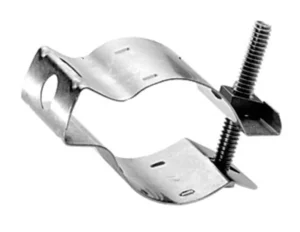
A support clamp transfers the weight and external loads of a waveguide run to a bracket or structure. A flange clamp holds a mating joint together. A pressure-sealing joint may also require a specified gasket, seal groove and leak-test procedure; a support clamp does not supply those functions.
For a supported run, select waveguide standoffs and hangers from the section geometry, mounting arrangement and installation loads. For a detachable RF connection, check the quick-disconnect assembly and its mating flange drawing.
Use a controlled installation specification
The installation package should identify the following requirements before assembly. An unresolved value belongs in the engineering review, not in an installer’s estimate.
- Clamp and waveguide identity
- Record the part number, drawing revision, waveguide cross-section and permitted clamp locations. Check that the clamp seats on the intended surfaces without loading an unsupported wall or adjacent component.
- Support layout
- Specify the support positions, bracket stiffness and loads from the waveguide, bends, attached equipment, wind or vibration. Define which supports locate the run and which allow movement.
- Fastener assembly
- Identify bolt size, thread, material, washer arrangement, locking method, torque and lubrication condition. A torque value without these conditions is incomplete.
- RF interface
- Identify the mating flange, aperture orientation, alignment features, gasket and any intentional choke or sealing geometry. Check the waveguide flange interface dimensions before assembly.
- Acceptance criteria
- Define dimensional checks, RF limits and any required pressure, environmental or electrical-bonding tests, with methods and pass/fail values.
Set torque for the actual fastener and joint
Tightening torque is an indirect way of producing bolt preload. Friction, plating, lubrication and the bearing surfaces affect the relationship, so the same torque can produce different clamping forces. NASA’s Fastener Design Manual covers these factors, fastener materials, corrosion and locking methods; it is engineering guidance, not a waveguide-clamp torque schedule.[1]
Use the torque and tightening sequence specified for the approved hardware. Record the tool identification and calibration status. Do not add lubricant, substitute a locking fastener or change a washer without checking the torque specification, because that changes the joint being tightened.
Inspect the waveguide and clamp while tightening. Stop if the clamp bottoms out before seating, the wall distorts, a fastener binds or the joint must be pulled into alignment. More torque is not a remedy for a mismatched part.
Choose support spacing from loads and permitted movement
Waveguide width alone does not determine support spacing. Evaluate the section stiffness, unsupported span, attached mass, installation direction and allowable displacement. Provide separate support for a heavy component when its weight would otherwise load a waveguide joint.
Allow for thermal movement without opening the RF interface arbitrarily. Define fixed and sliding support locations on the assembly drawing; do not insert a generic clearance between mating flange faces. The correct treatment depends on the flange design and any specified seal.
A flexible waveguide section may accommodate a defined offset, but its permitted bend radius and motion must match the installation. It should not become the support for adjoining equipment.
Install without forcing the RF path into position
- Make the system safe for mechanical work. Isolate the RF source and follow the equipment procedure for electrical energy and any pressurized section.
- Inspect the mating parts. Check for debris, damaged contact surfaces, distorted waveguide walls, worn threads and missing alignment hardware. Use the specified cleaning procedure.
- Position the supports and components. Align the waveguide naturally before tightening. Do not use flange bolts to pull a misaligned run into place.
- Fit the specified seals and hardware. Confirm aperture orientation, gasket position and clamp seating. Tighten in the approved sequence to the specified condition.
- Check the completed run. Verify support seating, clearances, fastener retention and permitted movement. Record deviations before RF or pressure acceptance.
Verify mechanical fit and RF performance separately
A mechanically secure clamp does not prove that the RF joint is acceptable. Measure reflection and insertion loss over the required operating band using defined reference planes. NIST research demonstrates that imperfect waveguide test-port interfaces can affect VNA calibration, so record the calibration and connection conditions when comparing measurements.[2]
Keep the measured quantity clear. For example, VSWR of 1.5:1 gives |Γ| = (1.5 − 1)/(1.5 + 1) = 0.20, corresponding to 4% reflected power and approximately 14 dB return loss at that reference plane. This calculation is not a clamp acceptance limit and does not by itself determine an antenna’s EIRP.
For a pressurized run, apply only the approved pressure and leak-test procedure. For an electrical bonding requirement, verify the specified bonding path and test it as required; do not assume that every metal support provides an adequate bond.
What to include in a clamp or support inquiry
Send the waveguide size, clamp function, mating drawing, mounting surface, support layout, attached loads and operating environment. Add RF frequency and acceptance limits when the clamp forms part of a flange connection. Submit the assembly drawing and installation requirements so the quotation can identify the hardware and the unresolved engineering checks.